STEP 2. Charging Battery
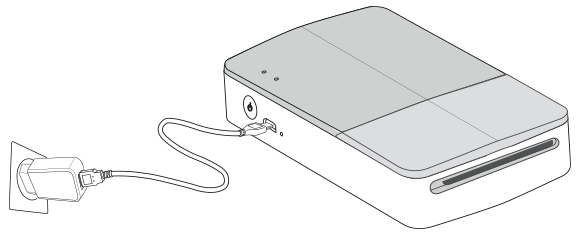
This device uses a built-in battery. Before using it, fully charge the battery using a Smart phone USB data cable (Micro 5 pin) or adapter. (Refer to below)

  • Battery charging time : 1.5 hours

Checking the charging status with LED indicators

  • Power-off
  • Charging
  • Full charge
  • 0 % : flashes for about 30 sec. and turns off.
  • LG Pocket Photo is always charged when connected to the power supply except for being printed.
  • To charge this product, you must always use a DC 5V, 1A or more. Certified/Listed Adapter which complies with LPS.

Caution

  • Handle with care during charging to prevent electric shock.
  • Do not place near heating appliance.
  • Do not disassemble or deform.
  • Do not give shock on.
  • Avoid too high or low temperature or humidity.

Note

  • You can connect the device to PC using a Smart phone USB data cable, but charging time can be longer.
  • The operating time on battery may vary depending on the battery status, operational status and environment conditions.
  • When the battery is discharged, printing is available after charging it for more than 10 min. (Charge in full to print in a row.)