STEP 3. Inserting Photo Paper
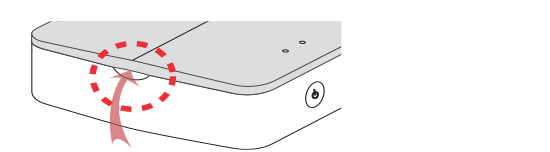
 Open the upper cover.
 Unpack the photo paper pouch you bought.
  Slide Smart Sheet (Blue) and photo papers together into the paper insert slot.
Smart Sheet will be ejected automatically before first printing.
Slide Smart Sheet (Blue) and photo papers together into the paper insert slot.
Smart Sheet will be ejected automatically before first printing.

- Arrange all papers and smart sheet to end of rear.
- Smart Sheet with Barcode side down
- Photo Paper with White side up
Cleaning printer head using Smart Sheet
Smart sheet (Cleaner)

About photo paper
Photo paper pouch
