STEP 5. Printing Photo
Printing using Bluetooth
Preparation : Turn the device on, and start printing with the LED indicator  turning on.
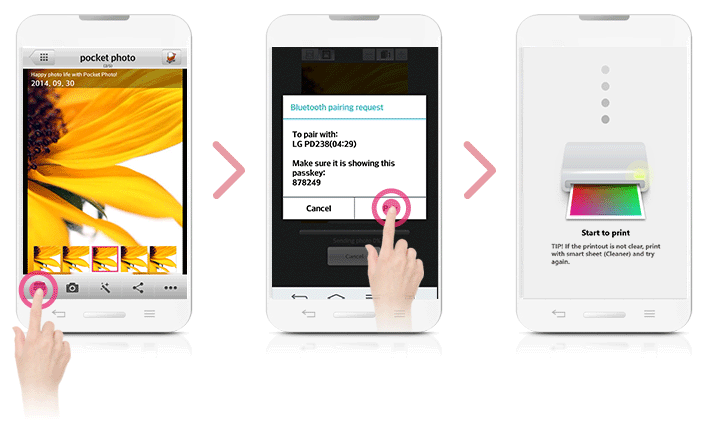
 Run LG Pocket Photo App on Android phone.
 Select a photo to print, and touch [
  ]
] Touch [OK], then it will start searching for Bluetooth devices.
 When LG Pocket Photo is paired for the first time, [Bluetooth pairing request] appears. To start printing, touch [Pairing] or input the PIN code ‘0000’.
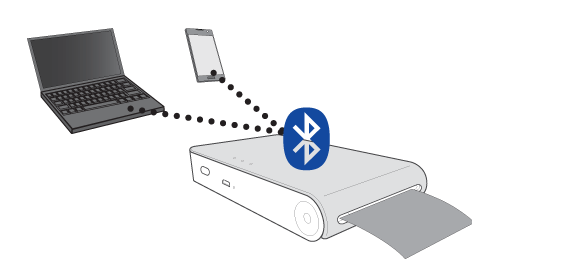
You can print photos directly from Android phones or PC via Bluetooth without the App.Choose a photo and select [Bluetooth] in [Share] or [Menu].
Setting Pocket Photo App of Android phone
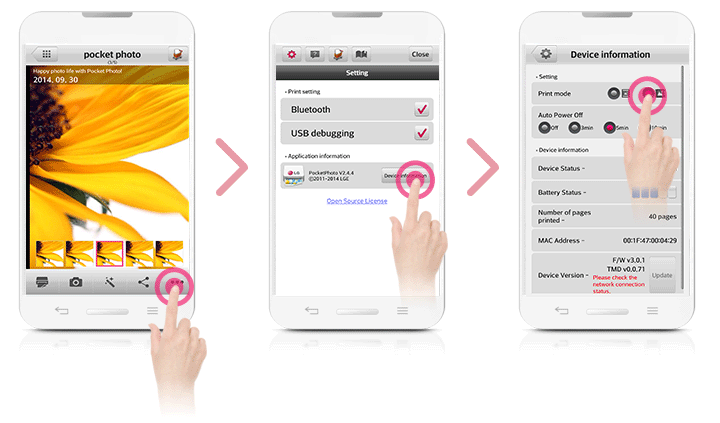
You can check remaining battery, the number of the photos printed, Help, Where to buy paper, device version, update, MAC address, and setting of print mode, etc.
- Run LG Pocket Photo App on Android phone.(To check [Device information], set to [On] the Bluetooth of smartphone.)
- Go to Setting.
- Touch [Device Information].
- [
 ] Paper Full : Prints without white space. (The edge of the image can be cut off.)
 - [
 ] Image Full: Prints an image as a whole. (White space can occur at the edge of the paper.)
 - Auto Power Off: Set a time so that the device turns itself off. (Default is [5 min]. If you set to [Off], the device can be on for up to 2.5 hours when fully charged.)